
After my first successfully completed Python class (MITx 600.1x on EdX), I felt like the whole new world of opportunities opened up in front of me. It was very intimidating and confusing (computational thinking is not my second nature, and probably not the third one either). But I had to start practicing the newly acquired skills before they dissipate.
I had had this idea of getting the data on powerlifting competitions from the USAPL website for a long time (I am a competitive powerlifter), but my previous attempts at scraping it failed:
- Attempt #1: I did what I knew best: ctrl+a, ctrl+c, ctrl+v into Excel. It didn’t work well as I needed to do a lot of manual adjustments. And it felt like cheating.
- Attempt #2: I tried using R based on one of the Coursera lectures (in Data Science Specialization). It was a complete disaster… I gave up quickly.
The Python class I took provided me with no information on how to approach this problem, but it made me less intimidated in the face of unknown. So when I came across a podcast from Data Science Imposters on web scraping, I figured that BeautifulSoup might be the solution I had been looking for. I googled it and started experimenting. My first reference didn’t work. I tried running the provided sample code as it was, but it kept throwing errors. Stack Overflow to the rescue! After many hours of tweaking I made it work. At first, it was just individual lines of code. They eventually morphed into a function (the actual code is in here):
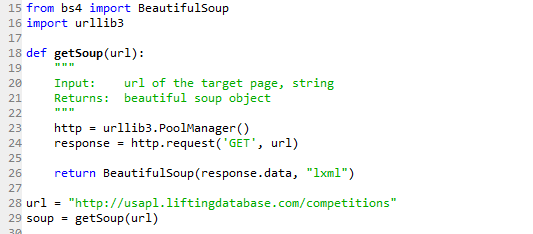
With this code I am pulling data from http://usapl.liftingdatabase.com/competitions. I am working on a different post to explain why I need this data, stay tuned.
This function returns BeautifulSoup object. Say what? What do I do with it? (I knew what the general definition of “object” from the lessons on object-oriented programming in my Python class, but I had no idea what to do with this particular one). That’s when I actually had to do some reading because there was no way to bypass this part. It is hard without any knowledge of html and such, but step by step it’s possible to learn enough to solve the puzzle. I spent a lot of time on the USAPL competitions source page (right click on the page and select ‘View page source’) to learn its structure and figure out how to locate the data on it through tags.
I was able to extract all the necessary data from that beautiful soup object using following methods:
- .find()
- .find_all()
- .get_text()
For example, consider the following:
souptable = soup.find(“table”, class_=”tabledata”).find(‘tbody’).find_all(‘tr’)
Here’s what it does:
- Find first instance (and the only in this case) <table class=”tabledata“> in soup object. Now the rest of the code will be applied to lines 246-10133 on the source page.
- Within all the data from #1 find first instance of <tbody> (there is only one <tbody> tag within <table class=”tabledata“>). Now the rest of the code will be applied to lines 258-10132 (basically, I want to ignore <thead>).
- Within all the data from #2 find all instances of <tr> (table rows) and put each instance in the set souptable. Each <tr> contains information on one competition.
If I run this code now, I get 1,097 elements in souptable because that’s how many competitions are listed on the website at this moment.
What do I do with this next? Well, in my case I wanted to write the list out into a .txt file. Based on some research I have done, I need to create a dictionary out of souptable (One cannot overestimate the power of Python dictionaries. The better you know them, the easier your life will be).
But before building the dictionary, I have to think of its structure:
- What are the keys? After spending many hours figuring out the structure of the USAPL database (another post on that is in the works), my final answer was the text within quotes in <a href=””>, which contains unique competition ids.
- What are the values? Competition table contains the following columns: Date, Name, Sanction #, State, Results, Homepage (<thead> tag contents). The easiest solution is to use all of them as sources of values. That would also mean that each competition record needs to be a standalone dictionary.
- Therefore, the output dictionary will be a nested one:
- Level 1 keys: competition id (text between quotes in <a href=””>)
- Level 1 values = Level 2 keys: “Date”, “Name”, “Sanction #”, “State”, “Results”, “Homepage”.
- Level 2 values: contents of Level 2 keys, which is actual dates, names etc.
And here’s how I did this:
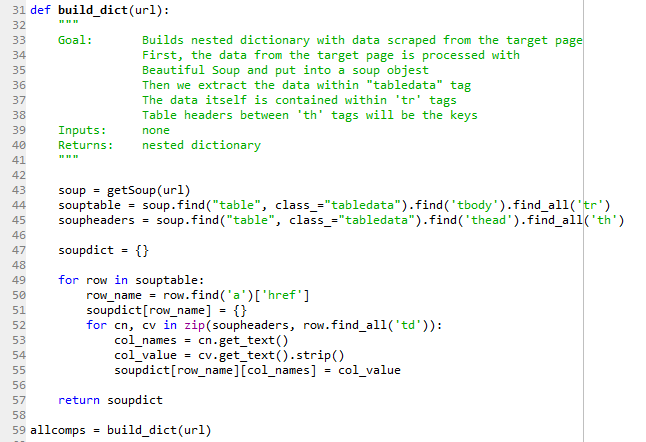
Before I explain how this code works, let me show some behind the scenes outputs.
- soup will contain the source page as it is.
- souptable is a set. So if I call souptable[0] I get:
<tr>
<td>11/19/2017</td>
<td><a href=”competitions-view?id=1824″>Quad City Iron Thriller</a></td>
<td>IA-2017-06</td>
<td>Iowa</td>
<td style=”text-align: center;”><img src=”img/check_16.png”/></td>
<td style=”text-align: center;”></td>
</tr>
- The printout of soupheaders is:
[<th>Date</th>, <th>Name</th>, <th>Sanction #</th>, <th>State</th>, <th>Results</th>, <th>Homepage</th>]
- The printout of allcomps starts as following:
{‘competitions-view?id=1824’: {‘Date’: ’11/19/2017′,
‘Homepage’: ”,
‘Name’: ‘Quad City Iron Thriller’,
‘Results’: ”,
‘Sanction #’: ‘IA-2017-06’,
‘State’: ‘Iowa’},
Now let’s break down the logic of going from soup to allcomps:
- Split soup by <tr> tags and put the resulting set into souptable then
- Iterate over souptable elements and for each element (row)
- Extract href= text and put it into row_name and
- For each row_name initiate new sub-dictionary, then
- Populate this sub-dictionary by
- Setting its keys to the text within soupheader elements and
- Getting values by splitting each row of souptable based on <td> tags and
- Extracting text within <td> tags
This logic works for this particular page with this particular structure. But it should be easily transferred to another page as long as you spend some time figuring out its structure and dependencies.
Next step – writing to csv! I had to do some research on the Internet to figure it out. I don’t know if this solution is the most effective or well written, but it does exactly what I need.
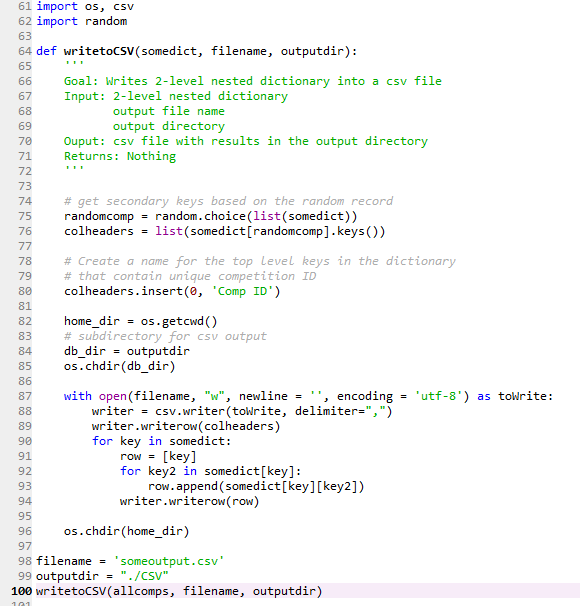
Here’s what you need to know about it:
- To have correct column names in the csv file, you need to create a variable containing a list of column names (colheaders) based on secondary keys. However, there will be a column for the primary key as well, so we need to add its name to the list (‘Comp ID’). Alternatively, you can create a .csv file without column names and add them later at the processing stage. But I don’t like this solution.
- I create a separate directory (‘CSV’) within my home directory for the output file. It’s not a requirement, but I like to keep my code separate from other files.
- This function works only for 2-level dictionaries. But by removing or adding a for loop, it should be easy to adjust for simpler/more complex dictionaries.
Here’s a snapshot of top rows (full output is here):
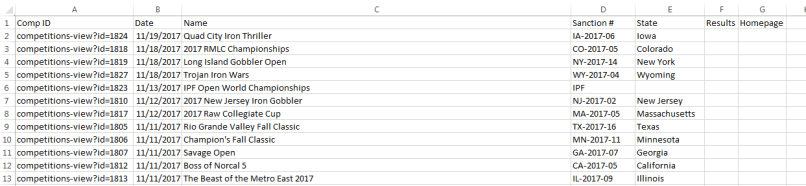
Looks neat and clean!
Probably there are better ways/formats to output scraped data, but (1) I work a lot with Excel, (2) I know how to ingest .csv data into R, (3) with a few small tweaks I can make it work for other pages. Hence, this solution works for me.
What is the main conclusion of this post?
- You can scrape data from the Internet with very basic knowledge of Python.
- It will take time to figure out how to do it because there are a lot of small details that need to be adjusted. But you don’t need any special knowledge, just logic and Google.
- Stack Overflow and other open resources most likely have all the answers to your questions. The key is to know how to phrase questions in Google.
- You don’t need the best/most efficient solution. You need the one that works for you. I did spend many many hours figuring it out. But now I can easily reuse the code for other pages and focus on the analysis part.
This code is an adjusted/simplified version of my project on getting most of the available data from the USAPL database. As I have mentioned previously, there are a few more posts in the works on why/how I did it. Some background information and all the data and code are already in here for your consideration. Hopefully, this was interesting and useful for you!
 Lifting Heavy Questions